


Point of Sale for Microsoft Dynamics 365 Business Central
Data Capture POS Dubai puts a fast, touch-friendly till inside Business Central. Your cashiers scan, take payment and process returns on one screen, and every receipt posts straight to your books as a sales invoice or credit memo. Items, prices, stock, customers and VAT stay in Business Central, so there is no separate POS system to run.
- Home
- Point of Sale for Microsoft Dynamics 365 Business Central

Transform Your Business with DC POS for Business Central Dubai
Find items by barcode, item reference, supplier part number or name, or tap category tiles that show how many items each holds.
Give line and basket discounts up to each cashier's limit, with a manager PIN approving anything above it on the same screen.
Buy X get Y, bundle prices and spend thresholds apply on their own and print on the receipt with the amount saved.
Suspend a sale while a customer fetches another item, serve the next customer, then recall the basket in one tap.
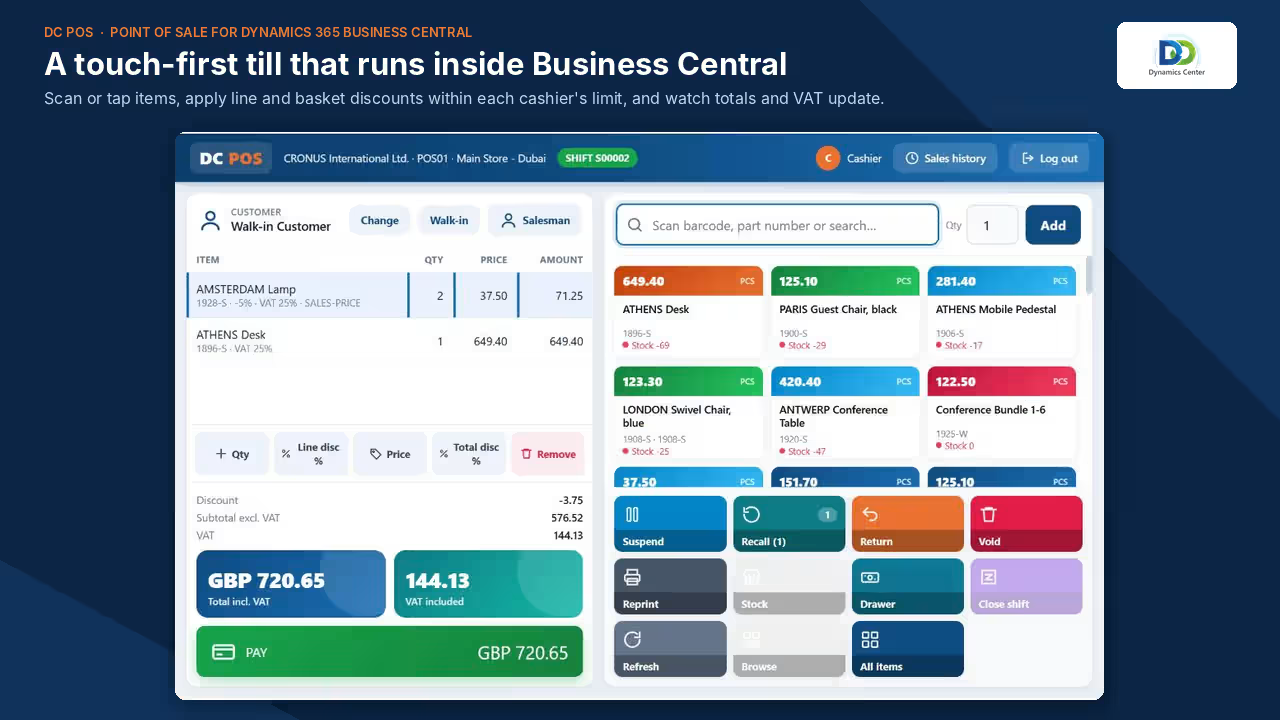
Take cash, card, on account, bank transfer, cheque, credit vouchers, club points and advances on one sale, with change calculated on cash.
On-account sales check the Business Central credit limit and blocked status before the sale completes, so nothing slips through at the counter.
Each store prints tax receipts in English, Arabic or both, with the VAT breakdown, tenders, change and the store logo.
Send the receipt to the customer's WhatsApp from the receipt preview, and the office sees every hand-over in Business Central.

Lines copy at the price the customer paid, and the till never lets a cashier return more than was sold.
Require a reason on every returned line and refuse receipts older than the store's return days limit.
Issue a voucher with a barcode and expiry date that the customer can spend at any branch once the return posts.
Start from the return, scan the new items, and settle only the difference in either direction.

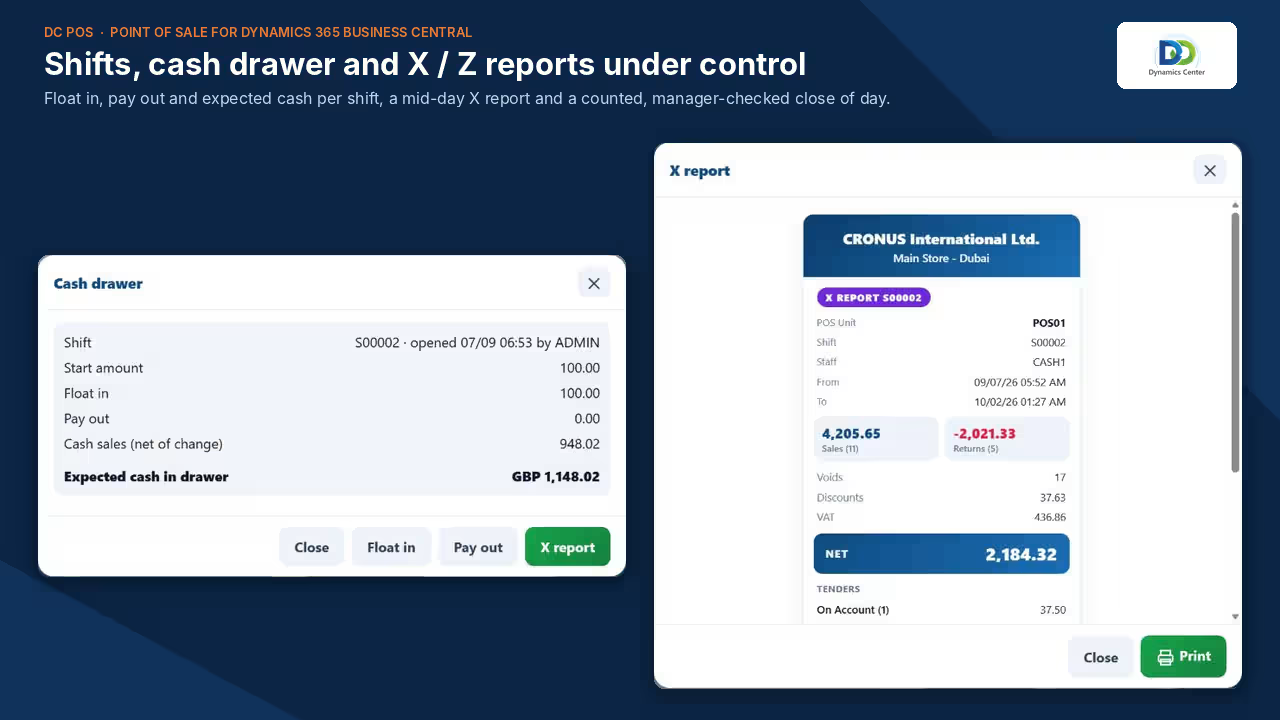
Open each shift with a counted start amount, and stamp the shift number on every receipt in that shift.
Record cash added to or taken from the drawer with a reason, and see expected cash at any moment.
Count notes and coins on screen, add a manager check, keep a closing float and print the Z report with over or short.
Give the office one cash-up report per store and day, and send the shift summary to the accounts team on WhatsApp.
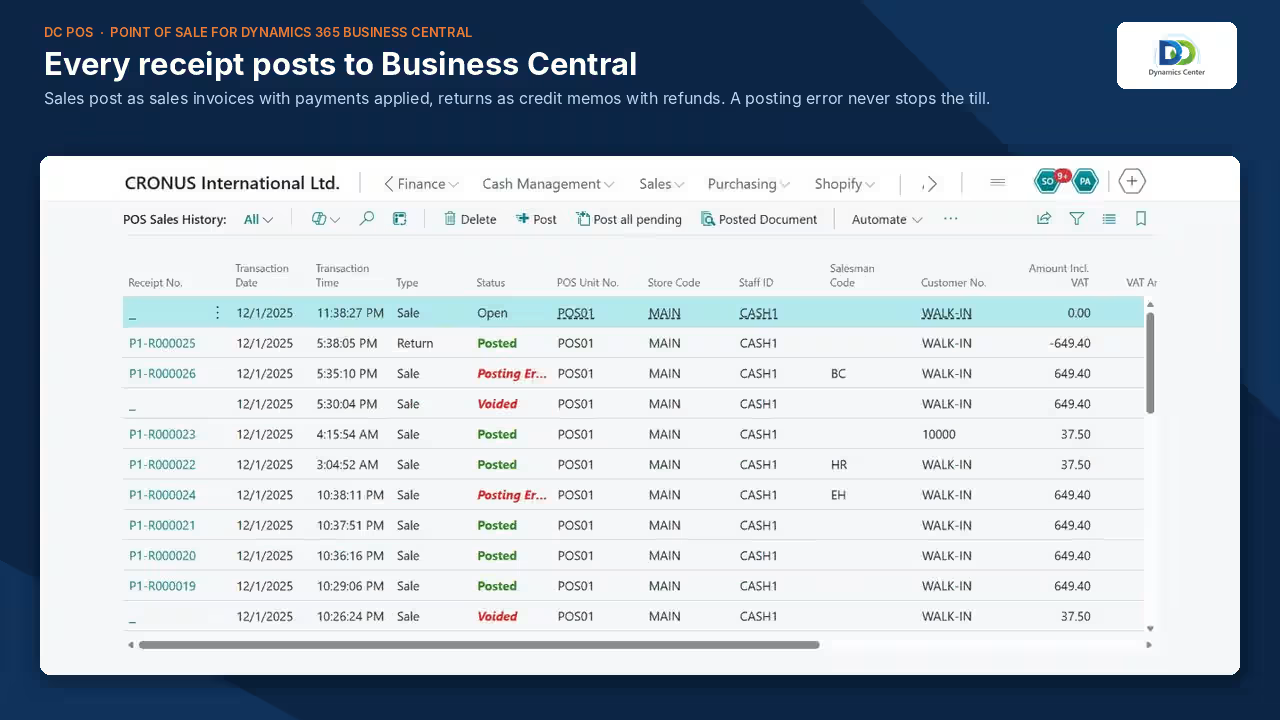
Sales post as sales invoices with payments applied; returns post as credit memos with refunds, immediately or in a batch.
If a receipt cannot post, the sale is saved and flagged, the till keeps selling, and the office re-posts it.
Store managers see net sales, average basket, cash expected in each drawer and items needing attention on one dashboard.
Read-only APIs feed a ready-made Power BI report covering sales, tills, salespeople, products, returns, tenders and reconciliation.
FEATURES
Experience the DC POS Difference
One System of Record
No separate POS server or database
Items, prices, customers, stock, VAT and the general ledger all stay in Business Central. The till reads them live, so the price on the shelf, the stock figure and the posted invoice always agree without a nightly sync.
Controls Built In
PIN login, rights and manager approval
Each staff member logs in with a PIN and has their own rights for discounts, returns, voids, price changes and Z reports. When a cashier goes beyond their limit, a manager approves on the same screen.
Made for GCC Retail
Arabic receipts, VAT and three-decimal currencies
Print tax receipts in English, Arabic or both. Amounts work to three decimals with cash rounding to the smallest coin, so stores in Oman and the wider Gulf price and settle cash correctly.
Phones and Serialised Items
IMEI capture, returns and repair cases
Scan the IMEI for every phone sold, print it on the receipt and accept returns only for the unit that was sold. Repair and replacement cases follow the unit from intake to hand-back.
Multi-Branch Stock
Stock by branch and transfers at the till
Check what every branch has free to sell, ask the office for a transfer, and ship or receive transfer orders at the till by scanning each item.
Loyalty and Customer Credit
Club points, vouchers and advances
Customers join with their mobile number, earn points on every sale and spend them later with a PIN. Credit vouchers and customer advances can be used at any branch.
OUR PROCESS
How It Works
Set Up
Create stores, POS units, staff and payment methods in DC POS Setup, mapped to your Business Central G/L and bank accounts.
Sell
The cashier logs in with a PIN, scans items, takes payment and prints or sends the receipt.
Post
Each receipt becomes a Business Central sales invoice with payments applied, or a credit memo with a refund.
Close
The cashier counts the drawer, a manager checks it and the Z report prints with over or short per tender.
Report
Managers follow the day in the role centre and in Power BI, by store, till and salesperson.
The Dynamics Center Advantage
- Business-Focused Expertise – We design Data Capture POS Dubai around how GCC stores really trade: cash counts, manager approvals, VAT receipts and branch transfers.
- End-to-End Support – From store setup and data migration to cashier training and go-live support, one team takes you through every step.
- Industry-Aligned Solutions – Retail, electronics and mobile phones, showrooms and trade counters each get the till features their counters need.
- Seamless Microsoft Ecosystem – DC POS lives inside Business Central and connects to Power BI and Microsoft Teams through read-only APIs.
- Localized Business Solutions – Arabic receipts, three-decimal currencies, cash rounding and local mobile number formats are part of the product.
- Long-Term Partnership – Regular releases, a growing automated test suite and support from our Dubai office, Monday to Friday, 08:00 to 18:00 Gulf Standard Time.
Frequently Asked Questions
Can Dynamics 365 Business Central be used as a point of sale?
Do we need a separate POS server or database?
How do POS sales in Dubai reach our accounts?
Which payment methods are supported?
Can receipts be printed in Arabic?
What hardware do we need?
Does Data Capture POS in UAE work if the internet goes down?
Can we control what cashiers are allowed to do?
Does DC POS connect to card payment terminals?
What Business Central licences do the tills need?
See DC POS in Your Own Business Central
Book a demo and we will show DC POS running a full store day, from the first sale to the counted close, with every receipt posted to Business Central and reported in Power BI.
2405, Clover Bay Tower, Business Bay, Dubai, UAE
Monday to Friday, 9:00am to 7:00pm
