
Microsoft Copilot Studio

Build agents that know your business, not chatbots that repeat your FAQ page.

Copilot Studio

Copilot Studio is the successor to Power Virtual Agents, and the change is more than a rename. Where the earlier product built conversational bots from scripted topics, Copilot Studio builds agents that reason over your own content and take action in your own systems.

The practical difference is what happens when a question falls outside the script. A scripted bot escalates. An agent grounded in your policies, product data and ERP records answers — or completes the task.
What you can build

01

An HR agent answering leave, gratuity and policy questions from your own handbook, available in Arabic and English.

02

A customer service agent that checks order status in Business Central or Finance & Operations before answering.

03

An internal IT or finance helpdesk agent that raises and tracks tickets rather than just describing the process.

04

A sales support agent that retrieves pricing, stock and credit position during a customer call.

05

A procurement agent that walks a requester through raising a compliant purchase requisition.

Agents designed around real business processes, connected systems and controlled access.

Grounded in your data

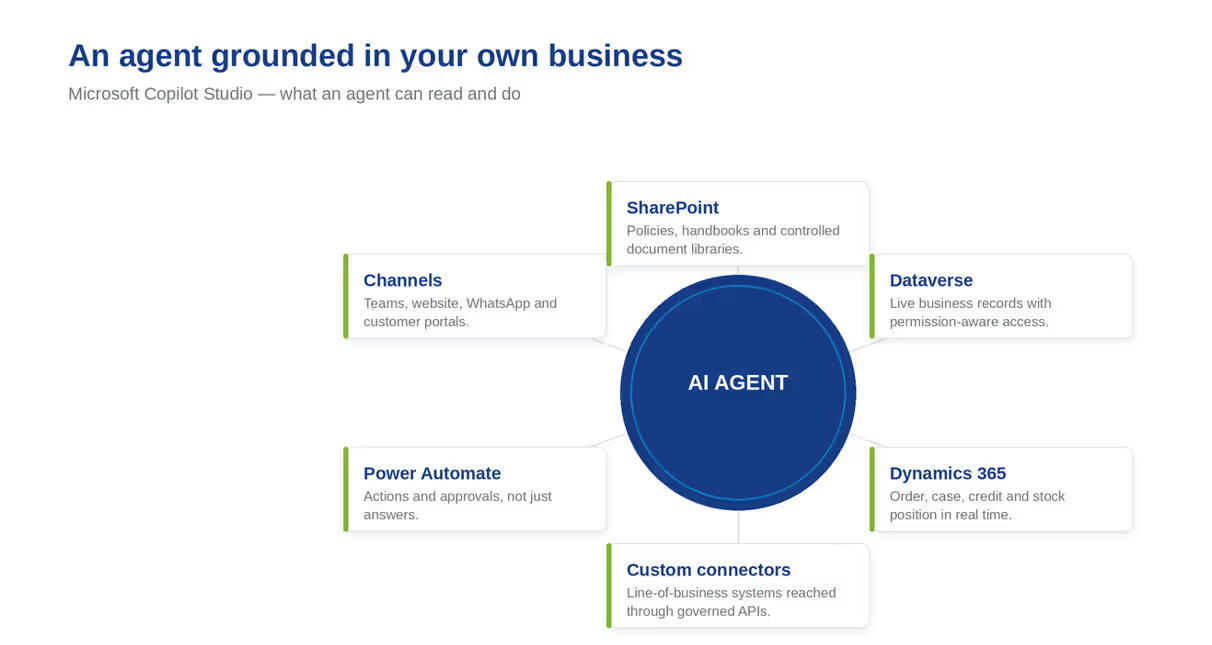
An agent is only as useful as what it is allowed to read. Copilot Studio agents can be grounded in SharePoint document libraries, Dataverse tables, Dynamics 365 records, public websites and custom connectors to line-of-business systems.

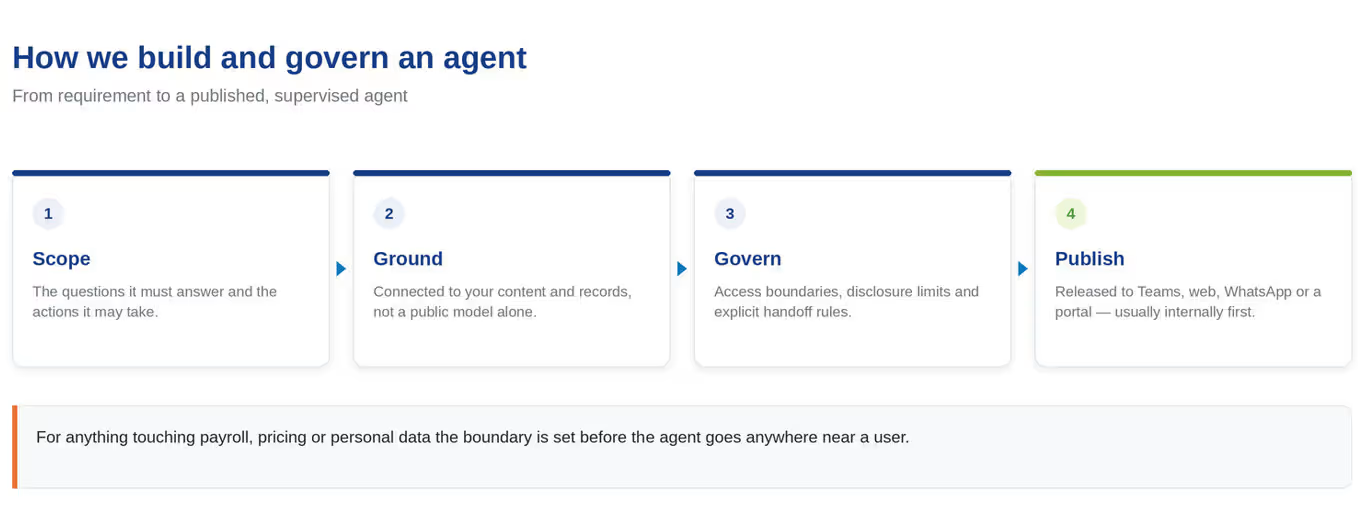
Governance matters as much as capability. We define what each agent may access, what it must never disclose, when it must hand off to a person, and how conversations are logged for audit. For anything touching payroll, pricing or personal data, that boundary is set before the agent goes anywhere near a user.

01 / DOCUMENTS

SharePoint document libraries

02 / DATA

Dataverse and Dynamics 365 records

03 / SYSTEMS

Websites and custom connectors

Channels

Agents can be published to Microsoft Teams, your website, WhatsApp, a customer portal or an internal SharePoint site. Most organisations start internally, where the tolerance for iteration is higher, then extend outward once the agent has proved itself.

Why Dynamics Center

01

We build agents against real systems, not demo data, so they are useful on day one.

02

We set access boundaries and escalation rules before deployment, not after an incident.

03

We design bilingual agents where the audience needs them.

04

We hand over with your team able to extend topics and knowledge sources themselves.

Frequently Asked Questions

Is this the same as Power Virtual Agents?

Copilot Studio is what Power Virtual Agents became. Existing bots carry forward, and the capability is considerably broader — particularly around grounding in your own data and taking action in connected systems.

Can an agent update our ERP?

Yes, through connectors and Power Automate flows, with whatever approval steps you require before a write action.

How do we stop it giving wrong answers?

By constraining what it is grounded in, testing against real questions before release, and defining explicit handoff rules. We also recommend starting internally where errors are cheap.

Does it work in Arabic?

Yes. We build and test Arabic agents where the audience requires it.

What licensing is required?

Copilot Studio is licensed separately from Dynamics 365. We confirm the current model against your intended usage volume during scoping.

Dynamics Center

Discuss an AI agent for your team

Speak to a certified Microsoft partner based in Business Bay, Dubai.

Contact Dynamics Center

Landline +971 4 254 0212
Mobile +971 55 625 5794

info@dynamicscenter.com

2405 Clover Bay Tower, Business Bay, Dubai, United Arab Emirates

Coverage hours: Monday to Friday, 08:00 to 18:00 Gulf Standard Time.

×

    Get in Touch for Pricing

    LinkedIn WhatsApp Chat info@dynamicscenter.com
    ×