Construction Management for Microsoft Dynamics 365 Finance
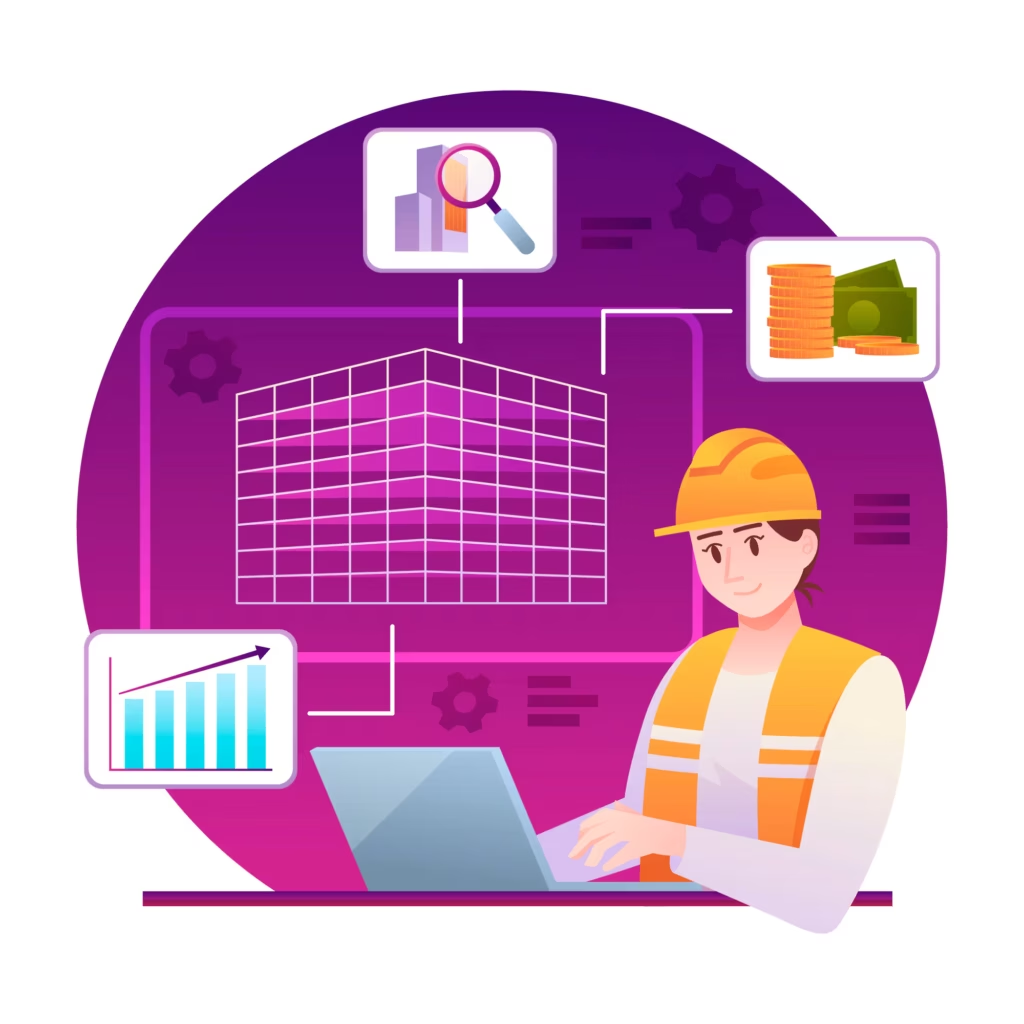
DC365 Construction sets up Dynamics 365 Finance and Supply Chain Management for contractors. Your schedule activities become the work breakdown structure, your bill of quantities becomes the approved budget, and every subcontract, material issue and site hour carries its activity. The Construction Cockpit for Power BI shows budget, actual and forecast for every project.
- Home
- Construction Management for Microsoft Dynamics 365 Finance

Transform Your Projects with DC365 Construction for Dynamics 365 Finance
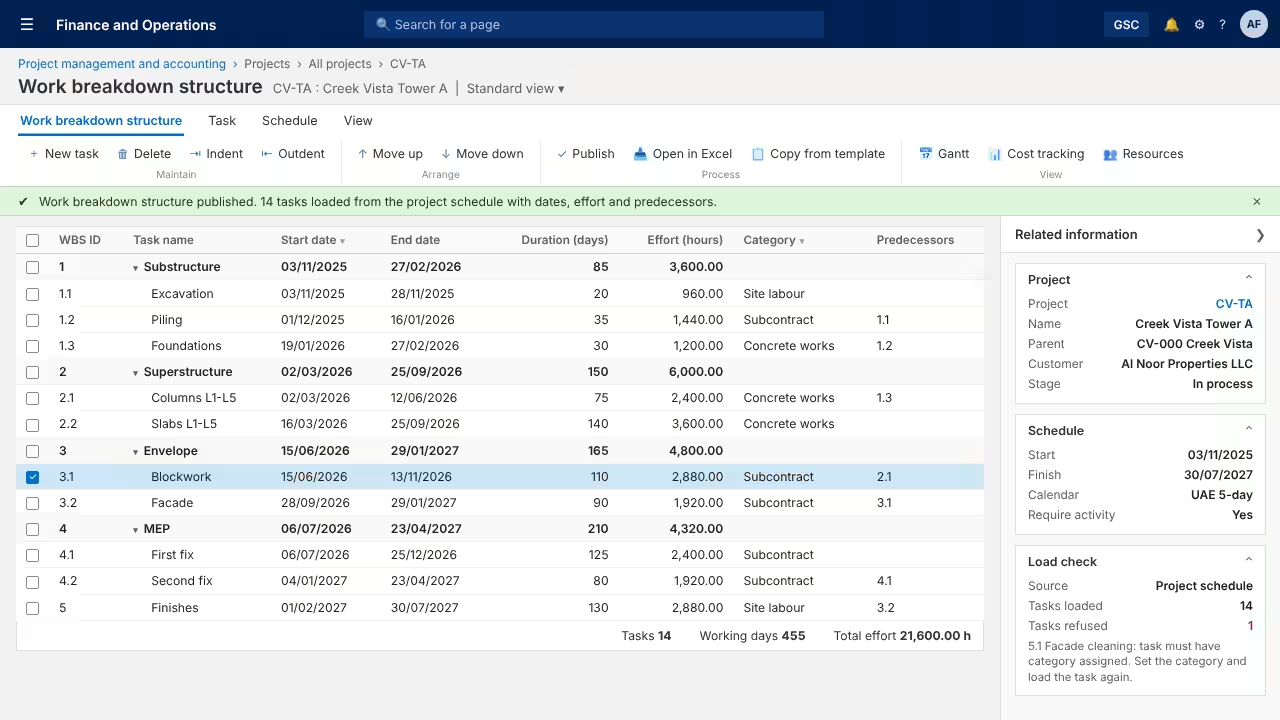
Load schedule activities with dates, effort and predecessors into the work breakdown structure through the standard data template.
A task without a project category is refused, so incomplete data never reaches the project ledger.
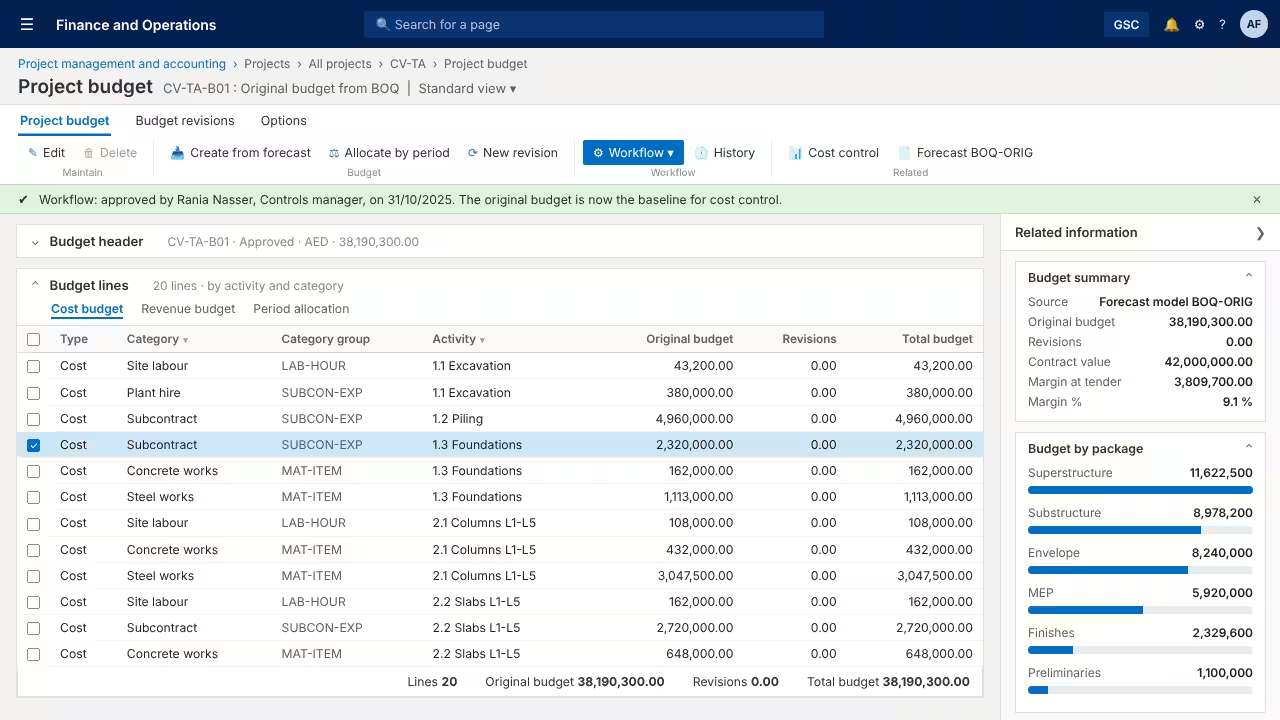
Load the bill of quantities into project forecasts by activity and category, then create the original budget from it.
Route the budget for approval through the project budget workflow, and keep every later revision against the original.
Subcontractors are approved per procurement category, and buyers are warned when an order goes to a vendor not approved for it.
Each subcontract is a purchase agreement with Max is enforced, and linked release orders cannot exceed the remaining value.
Purchase orders carry the project activity and category, and cost commitments are tracked for project purchase orders.
Vendor retention terms hold the agreed percentage on each certified claim, with release stages defined in the terms.
Keep a central store and a warehouse per site, with on-hand stock and transfers between them in Supply Chain Management.
Charge cement, rebar and other materials to the activity through item requirements or the project item journal.
A project journal line without an activity is refused, because activity-wise costing only works when nobody can skip it.
Supervisors post the gang’s site hours by activity through hour journals, and staff can record timesheets by activity.
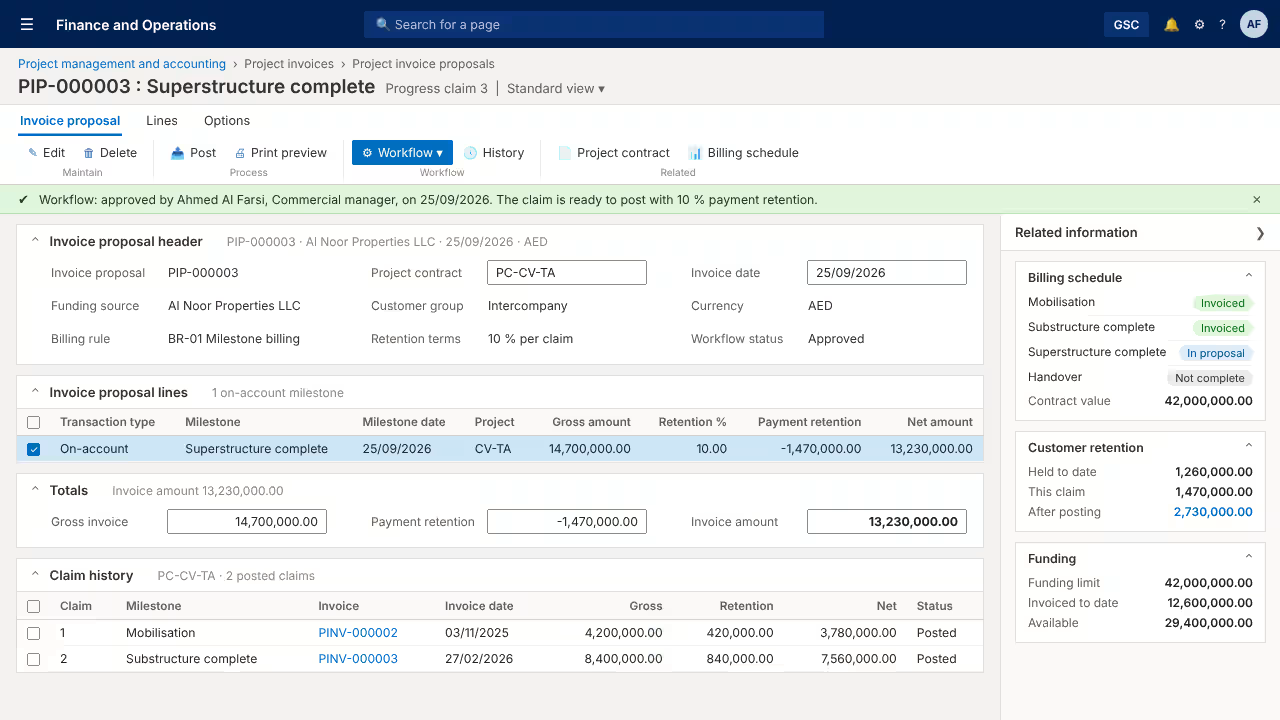
Set the claim schedule on the project contract, with a funding limit equal to the contract value.
A milestone appears in the invoice proposal only after it is marked complete, so the client is never billed ahead of the work.
Payment retention is deducted from each claim and tracked as a receivable until it is released.
Periodic revenue recognition is set up for percentage of completion (cost to cost) on fixed-price projects.
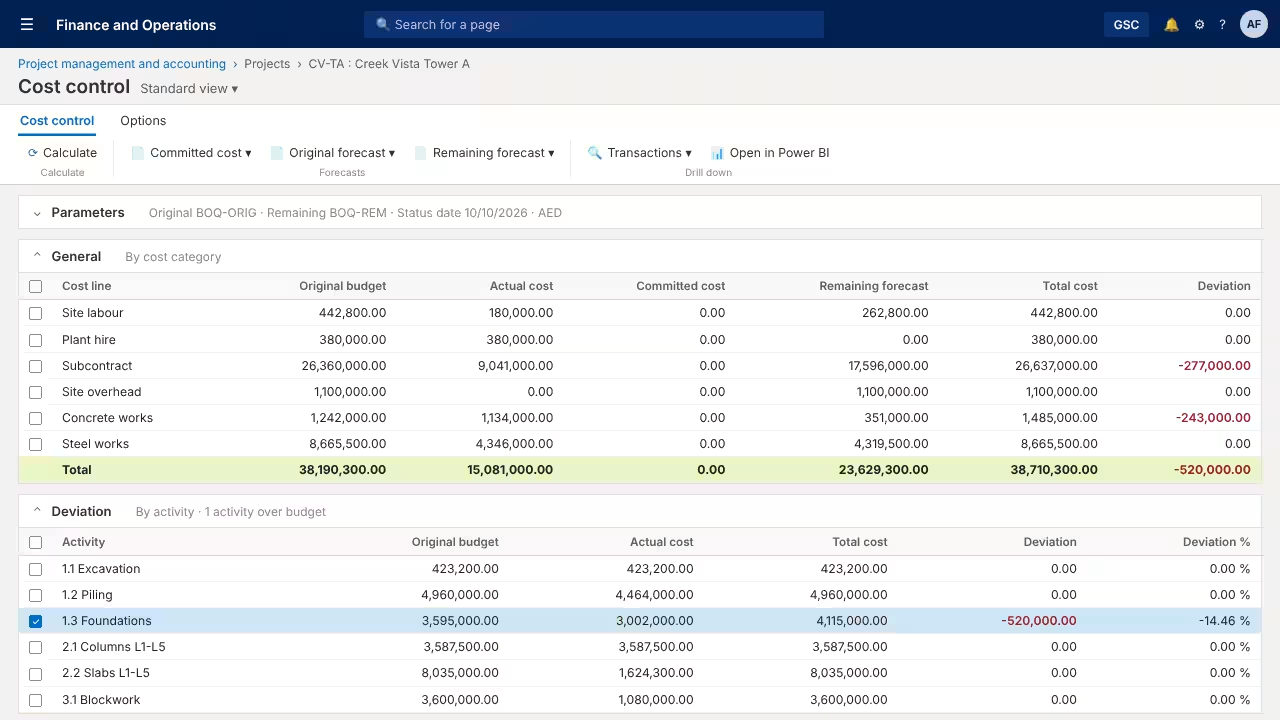
Compare the original BOQ budget with actual, committed and remaining cost on one page for every project.
See the deviation by cost type and by activity, then drill to the transactions behind the number.
A 14-page Power BI report covers cost, activities, earned value, commitments, subcontractors, billing, cash flow and materials.
Copilot in Power BI answers questions such as “which activities are over budget” from the cockpit data.
FEATURES
Experience the DC365 Construction Difference
Standard Dynamics 365
Configuration, not a second system
DC365 Construction uses Project management and accounting, procurement and inventory in Dynamics 365 Finance and Supply Chain Management. There is no separate construction database and no custom code to carry through Microsoft updates.
Activity on Every Dirham
One cost code from plan to claim
The schedule activity is the cost code for budgets, orders, material issues and site hours. Reports read the same activity everywhere, so nobody re-keys site sheets at month end.
Retention Both Ways
Held from subcontractors, deducted by clients
Vendor retention terms hold retention on each subcontractor invoice, with release stages defined in the terms. Customer payment retention is deducted on every progress claim and tracked until release.
Contractor and Developer Together
Intercompany in one tenant
Run the contracting company and the developer as separate legal entities in one Dynamics 365 tenant, with intercompany customer, vendor and accounting set up between them.
A Cockpit for the CFO
Fourteen Power BI pages, every figure traceable
Contract value, estimate at completion, margin, earned value, retention, billing and cash flow on one report, built on your posted project transactions in Dynamics 365 through standard data entities.
Copilot on Your Project Data
Questions answered in plain language
Copilot in Power BI answers questions on the cockpit. Optional Fabric data agents for project cost and for subcontracts and retention are available in preview on a paid Fabric capacity.
OUR PROCESS
How It Works
Workshop
Three hours with planning, estimating, procurement and finance to agree activity codes, BOQ structure, retention and billing rules.
Configure
Dynamics Center sets up legal entities, project categories, forecast models, retention terms, billing rules and approval workflows.
Load
Your schedule and bill of quantities load through the standard data templates into the work breakdown structure and project forecasts.
Run
Your team raises subcontracts, issues materials and records hours against the activity, and posts milestone claims with retention.
Report
The Construction Cockpit reads the posted data, and the CFO follows budget, actual and forecast for every project.
The Dynamics Center Advantage
- Business-Focused Expertise – We configure Dynamics 365 around how contractors work: activity codes from the programme, budgets from the estimate, retention and milestone claims.
- End-to-End Support – From the requirements workshop and data loads to user training and the first live project, one team takes you through every step.
- Industry-Aligned Solutions – Main contractors, specialist subcontractors and developers with a contracting arm each get the controls their projects need.
- Seamless Microsoft Ecosystem – Finance, Supply Chain Management, Power BI and Copilot run in one Microsoft tenant with one support line.
- Localized Business Solutions – AED and GCC currencies, UAE VAT, and our own UAE e-invoicing app for Dynamics 365 Finance sit alongside DC365 Construction.
- Long-Term Partnership – Licences as a Microsoft Cloud Solution Provider and support from our Dubai office, Monday to Friday, 08:00 to 18:00 Gulf Standard Time.
Frequently Asked Questions
Can Dynamics 365 Finance be used for construction project accounting?
Does DC365 Construction need custom code?
Can we keep our current planning tool?
Can we load our bill of quantities?
How is subcontractor retention handled?
Can a subcontract value be capped?
Does it support a developer and a contractor in the same group?
Which licences do we need?
Are the Copilot features available in the UAE?
Does DC365 Construction work with Dynamics 365 Business Central?
See DC365 Construction on Your Own Project
Book a demo and we will run one tower project from the schedule and the BOQ budget to a subcontract with retention, a milestone claim and the CFO cockpit, all in Dynamics 365 Finance.
2405, Clover Bay Tower, Business Bay, Dubai, UAE
Monday to Friday, 08:00–18:00 Gulf Standard Time
